english home library| blackboard | digital literacy

Home

Schedule

Assignments

Quiz guides

Things you'll need

Student sites

All my classes

Blog

Schedule

Day Date Topic Homework for next class
T 10-Jan

Introduction to course and computer lab. Practice simple markup and FTP transfer.

Right click and save on desktop:

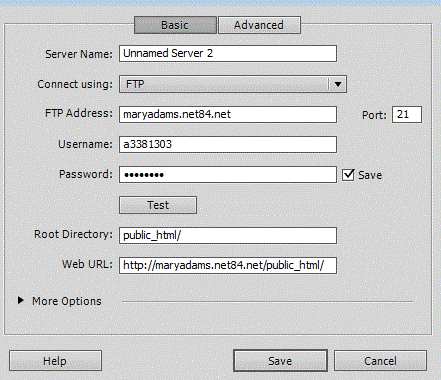
FTP: Open Filezilla. Use this data to login in:

  • host: www.prowritewcu.com
  • username lastnamefirstinitional304 (example: shakespearew304)
  • password lastnamefirstinitial_304 (example: shakespearew_304)

Reading:

Read Learning Web Design (LWD) chapter 2 and 3.

What to study for quiz

R 12-Jan

Discussion of Chapter 2 and 3

Practice web page using Dreamweaver (LWD chapter 4)

Other text editors good for coding


Reading:

  • LWD 21
  • Letting go of the Words (LGW) pp 163-170.

What to study for quiz

T 17-Jan

Finding and/ or purchasing ad-free server space (required for your personal site).

Using FTP


Read

  • LWD Chapter 5
  • LWD Chapter 11

What to study for quiz

R 19-Jan

Practice Coding (Chapter 5)

XHTML

Cascading Style Sheets

Editing Press releases


Read

  • LWD Chapter 12
  • LWD Chapter 13 (stop at Pseduoclass Selectors at the bottom of p.240)

What to study for quiz

T 24-Jan

Practice Chapter 12 (all exercises)

  • Use Filezilla to download exercise5.3.html from your class site (I uploaded the finished exercise)
  • Start making your way through the embedded style sheet exercises in Chapter 12

CSS

Read

  • LWD chapter 6
  • LWD chapter 13 (Pseudoclass and Pseudoelement Selectors 240-245)
  • LGW chapter 12

What to study for quiz

R 26-Jan

Practice Linking


T 31-Jan

Edited Press Release Due

Activity 1:

Practice styling links based on Thursday's content (Note: if you were absent during Thursday's crucial class, please sit next to someone who was here). Start by downloading your site using Filezilla (not Dreamweaver).

Activity 2: Peer Review

Activity 3: In-class acitivity (if time) Writing Meaningful Links

Activity 4: Encoding your email link: Encrypt your email link to avoid spam


Reading for next class

  • LWD chapter 7
  • LWD chapter 18

What to study for quiz


R 2-Feb

Practice with images

Coding

Working with images

Practice creating transparent images

  • Follow the instructions on page 379: Exercise 18-2. If you want to try this elsewhere, download a trial copy of photoshop or find a lab that has Photoshop.

Read

  • LWD chapter 13 (246-end)
  • LGW chapter 6

What to study for quiz

T 7-Feb

Practice

Discussion of press releases

Practice using background images

  • Exercise 13.2:
    • Save this zipped file to your desktop
    • Double-click to extract all files (say yes where needed)
    • Copy the file cabbage.html to your root folder.
    • Copy the image files to your image folder [this will add an extra step to the insructions in 13.2, so pay attention!]
    • When you finish, link the cabbage.html page to your root index.html page

Writing assignment 2: Rewriting articles

  • Example: WCU's EBriefcase pages
  • Assignment: Rewrite this page, layering it into a pathway page and one or more information pages. Put an informative link with description on your index page. Try to create a scenario for the likely audience visiting the page.

Read

  • LWD chapter 8
  • LWD chapter 14

What to study for quiz

R 9-Feb

Practice

Tables (briefly)

Boxes

  • Save this zipped file to your desktop
  • Double-click to extract all files (say yes where needed)
  • Copy the file jenware.html to your root folder.
  • Copy the images in the images folder to your images folder (do NOT copy the entire folder over, but do it by files)
  • Practice exercises 14.1-14.3 (continue at home as needed)

Read

  • LWD chapter 15

What to study for quiz

T 14-Feb

Revised English Education article due for peer reivew

Chapter 15: Practice editing the Jenware site from last class

Introduction to personal sites

Reading

  • LWD chapter 16

What to study for quiz

R 16-Feb

Peer review of Final English Education article due(post on class site by Tuesday)

Practice creating layouts:

  1. Begin by opening Dreamweaver and re-defining your site.
  2. Download and unzip the practice file. Extract all files when asked.
  3. Copy "olympus.html" into your root directory (link your index file to it).
  4. Copy "2col_bkgd.gif" to your images folder.
  5. To avoid confusion, delete the zipped file and folder entitled "LWD3e_chapter16.zip."
  6. Open olympus.html in Dreamweaver and start with exercise 16-1 on page 324.

Designing headers and navigational aids


Read

  • LGW chapter 3
T 21-Feb ADVISING DAY: NO CLASS
R 23-Feb

Designing page templates: where does stuff go?

Required elements of your personal site

Using scripts

Introduction to client sites

Read

  • LGW chapter 4
  • LGW chapter 7

What to study for quiz

T 28-Feb

Groups discuss client sites

Making logos and textures


R 1-Mar MIDTERM BREAK
T 6-Mar

Personal site template due today (either roughed out or coded). Bring writing samples and other career material you may want to include.


R 8-Mar

Form groups and select client sites. Client questionnaire (email or hand deliver).

Make an appointment to discuss content needs by March 15. Note that I need to see your questionnaire as part of your client site package.

Read

  • LGW chapter 5
  • LGW chapter 9
T 13-Mar

Putting your career content and writing on the web:

  • How to make a PDF document
  • When to use PDF
    • When showing off your ability to you can format a paper document
    • When formatting for print
  • And when not to use PDF
    • When document will be read online
    • When it contains instructions
    • When readers want to read only part of it
  • (and when to do both)
  • Problems associated with PDFS:
    • Orientation
    • Accessibility

Styling lists:

Styling tables:

Creating a site style guide

Read

  • LGW chapter 9
  • LGW Interlude 263-272 pp.
R 15-Mar

Guest speaker Brent Kinser, editor of Carlyle Letters Online: How Literature scholars use the web

Bring outline of client content needs along with assigned tasks for group by March 27. All content is due by March 29.
T 20-Mar

SPRING LITERARY FESTIVAL: No class


R 22-Mar

Peer review of personal site. Note that I will not accept sites for grades that have not met this deadline.

Read

LWD chapters 19

T 27-Mar

Chapter 19: Optimizing files

Personal site due for preliminary grade

  • Outline of client content needs (site map flow chart) and individual group members responsibilities (spreadsheet or word document) due. Submit electronically.


R 29-Mar

All written content due. Client template due by April 10.

Using Wordpress.

By April 10, bring client site template along with written approval of client.
T 3-Apr SPRING BREAK: NO CLASS
R 5-Apr SPRING BREAK: NO CLASS
T 10-Apr

Revised personal site due today.

Optimizing your site for search engines

Client template due today, along with written approval of client.

Installing Wordpress

  • On a paid site like Fatcow (just install from control panel)
  • on a free site (use this one: 000.webhost.com):
  1. login to control panel
  2. Create a MySQl database
  3. Copy host address, database name, username, and passowrd into a word file and save it
  4. follow these directions to install wordpress
    Visit your website: http://maryadams.site40.net
    Access control panel at: http://members.000webhost.com/ (login with your email and password)
Client style guide due Thursday. This style guide can be based on the Yahoo style guide but should include individual site decisions about word choice, spelling, and capitalization preferences for individual words as well as headline and font style recommendations.
R 12-Apr

Integrating Wordpress into your own site

  1. Download and install Wordpress (we covered this Tuesday)
  2. Design your template in Dreamweaver. Make sure that your image links are "absolute" or external URLs, not relative URLs (for example, <img src="http://maryadams.site40.net/images/bg.jpg" alt="background" />.)
  3. Code for Wordpress loop (copy this code into your template's main content area. Note: this code includes the heading. You can leave it out by using this code instead).
  4. Save your template as index.php. Save it and an external style sheet called "style.css" (I also use an inline style sheet) into the folder wp-content/themes/mystyle. Upload the whole mystyle folder to your site. Note that your template should have a link so the client can log in to the site (e.g. http://maryadams.site40.net/wp-login.php)
  5. Log into your wordpress site and select a new theme or template.
  6. Optional but recommended. Under Settings / Permalinks, change the Common Settings so that pages are named after the post name (e.g. http://maryadams.site40.net/sample-post/
  7. Create your home page (not a post) using the new template. It will be named after title you give it.
  8. Under Settings / Reading, direct the front page to be a static page, and select the home page you made as the front page (see illustration.)
  9. Make the content pages (not a post) using the new template.
  10. Then make sure your template menu correctly links to these new content pages (you'll need to check the permalink of each).

Client side style guide due. (Note: this style guide should be linked to the final client site. Use it to edit all written content).

Edt all content according to client style guide (due on April 19 with peer reviewed site).
T 17-Apr

Writing User Instructions for the web.

  • Write a set of instructions for the client to log onto site and edit content. Use Yahoo's guidelines for user instructions (above).


R 19-Apr

Preliminary Client site due for peer review and usability test.

Search Engine Optimization

Write a short memo to me summarizing each member's role in the project as well how you revised the site based on peer review, usability testing, and client feedback. Due on April 26 with revised group site.
T 24-Apr
R 26-Apr


Revised Group site due today

T 1-May 12-2:30: 303 EXAM TIME
W 2-May 12-2:30: 431 EXAM TIME
F 4-May 12-2:30 304 EXAM TIME